Planning a website? What to expect, from first call to launch
A checklist for business owners planning a new website: the tech, the words, the build and launch day, with the questions to ask at each stage.
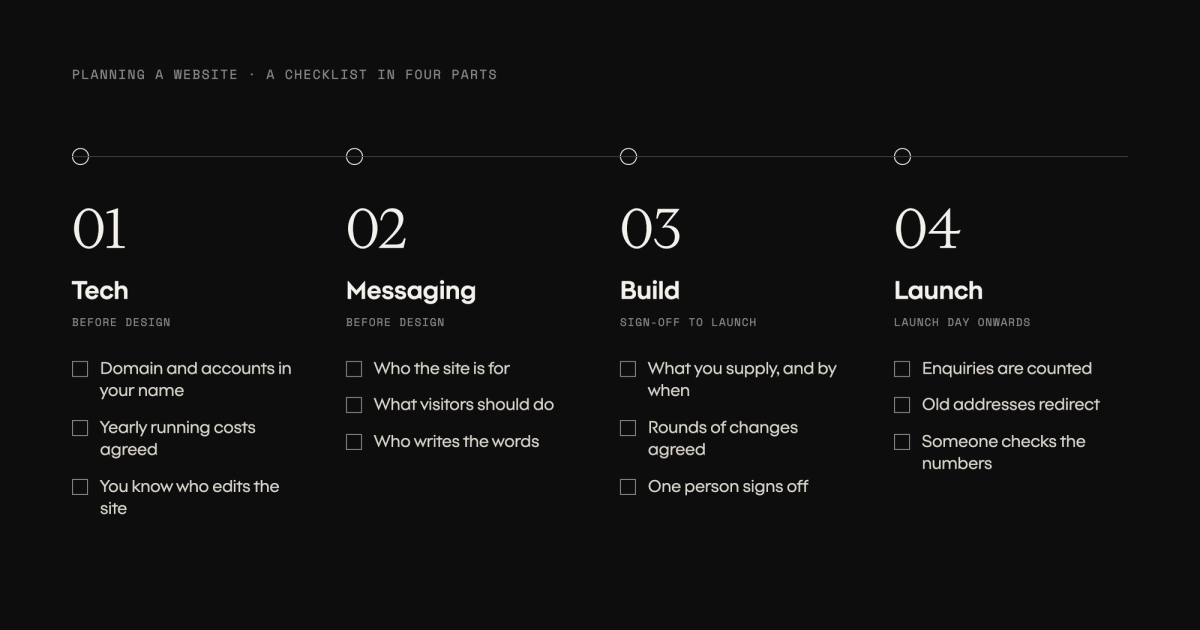
Most business owners commission a website a few times in their working life. The people building it do it every week. That gap is where the surprises come from: a launch date that slips, a hosting bill nobody mentioned, a site that looks finished but can’t tell you whether it brings in work.
This checklist covers the four parts of a website project, in the order you’ll meet them. Keep it beside you and tick things off as you go. Each part ends with questions to ask whoever is building your site. You don’t need to know how any of it is done. You only need to know it should be happening.
1. Tech: what you’re actually buying
The technical choices come before design, and most of them are invisible once the site is live. That’s why they’re easy to skip.
- The domain, your website’s address, is registered in your business’s name, and you can log in to it.
- You know where the site is hosted, who pays for it and what it costs each year.
- You know how the site gets updated. Either you can change words and images yourself, or you know who does it and what that costs.
- Your email keeps working. If your email uses the same domain as your website, changes to the site must not break it. If the site moves to a new address, your email may need to stay exactly where it is, and that takes planning.
- Google Analytics and Search Console are set up in your business’s name, with the people building the site added as users.
- You know every running cost after launch: hosting, domain renewal, any paid tools or licences, and maintenance.
Ask:
- Whose name are the domain and the accounts in?
- What will this cost to run each year after launch?
- If I want to change a sentence on the homepage, what do I do?
2. Messaging: what the site needs to say
Design is easier to react to than words, so many projects start with how the site should look. The words should come first. The layout depends on what has to fit, and a beautiful page with nothing clear to say won’t bring in work.
- You can say who the site is for, in one or two sentences, the way you’d describe a good customer.
- You know the one thing you want a visitor to do: call, send an enquiry, book or buy.
- You’ve listed the questions customers ask before they buy from you. Those answers become your pages.
- It’s agreed in writing who writes the words: you, the agency or a copywriter, and by when. In our experience this is the step most likely to hold a project up.
- You know which photos and proof you have, what still needs to be made, and whether you have permission to name clients or show their logos.
Ask:
- Who is writing the words, and when are they due?
- What do you need from me before design starts?
- How will we know a page is working once the site is live?
3. Build: what happens between sign-off and launch
Every project is different, so be wary of a timeline that isn’t tied to what you’ve agreed. What you can expect is the order of the work.
- Planning. Agree the pages, the content each one needs and what success looks like.
- Design. Usually a few key pages first. Once those are agreed, the rest follow the same pattern.
- Build. The designs become a working site, connected to whatever you’ll use to update it.
- Content. The real words and images go in. Expect to read every page, not just the homepage.
- Testing. Phones and computers, different browsers, every form, and how fast pages load.
Time rarely disappears in the build itself. It goes in waiting: for words, for photos, for feedback, and for approvals when several people need to agree. You can protect your launch date by naming one person on your side who gives the final yes at each stage.
Ask:
- What do you need from me, and by when, to keep the launch date?
- How many rounds of changes are included?
- Who signs off each stage, on your side and on ours?
- Can I see the site while it’s being built, before it goes live?
4. Launch: the day it goes live, and the weeks after
Launch day is a start, not a finish. Plenty of sites go live with problems nobody can see from the outside: enquiries that aren’t counted in Analytics, an old site still running at its old address, or every page answering at two addresses, which confuses Google. None of it shows on the site itself. All of it shows up once someone checks.
- Analytics counts enquiries. Someone sends a test enquiry and shows you where it appears in the reports.
- Visits from your own team and the people who built the site are left out of the numbers.
- Search Console is set up and has been given the site’s list of pages.
- If you had an old site, every old address sends visitors to the matching new page, and those redirects stay in place long term.
- Every page has one address.
- The contact form and email address have been tested from outside the business, such as a personal phone.
- Your customers know: update your Google Business Profile, social media profiles and email signatures.
- Someone is named to check the numbers in the first weeks and tell you, in plain words, what they show.
Ask:
- How will we know the site is bringing in enquiries?
- Who checks Analytics and Search Console after launch, and how often?
- What happens to the old site and its addresses?
Before you sign
If you get clear answers to the questions above, you’ll know what you’re paying for, what’s expected of you and how you’ll know it worked. Good studios are glad when clients ask. It makes the project go better for everyone.
Planning a new site and want a second opinion on a proposal? Talk to us.