Can you trust your website numbers? We checked ours.
We audited our own Google Analytics and found enquiries weren’t counted and three sites were mixed into one report. Here’s what to ask about yours.

In November we audited our own Google Analytics. We build websites for a living, so we expected it to be in good shape. It wasn’t.
The audit covered October 10 to November 6, 2026. Here is what we found.
- Enquiries weren’t counted at all. Someone could fill in our contact form and Analytics would record a page view and nothing more. The number that matters most to us was the one number missing.
- Three sites were mixed into one report. Fewer than half the page views in our report came from our new site. Over a third came from our old site, still running at its old address. About one in five came from our own development computer. The standard reports didn’t separate them.
- One page looked busier than it was. Our new service page was the second most viewed page in the report. All but one of those views were us, building and testing it.
- The history was short. Analytics was keeping detailed data for two months. Anything older was already gone.
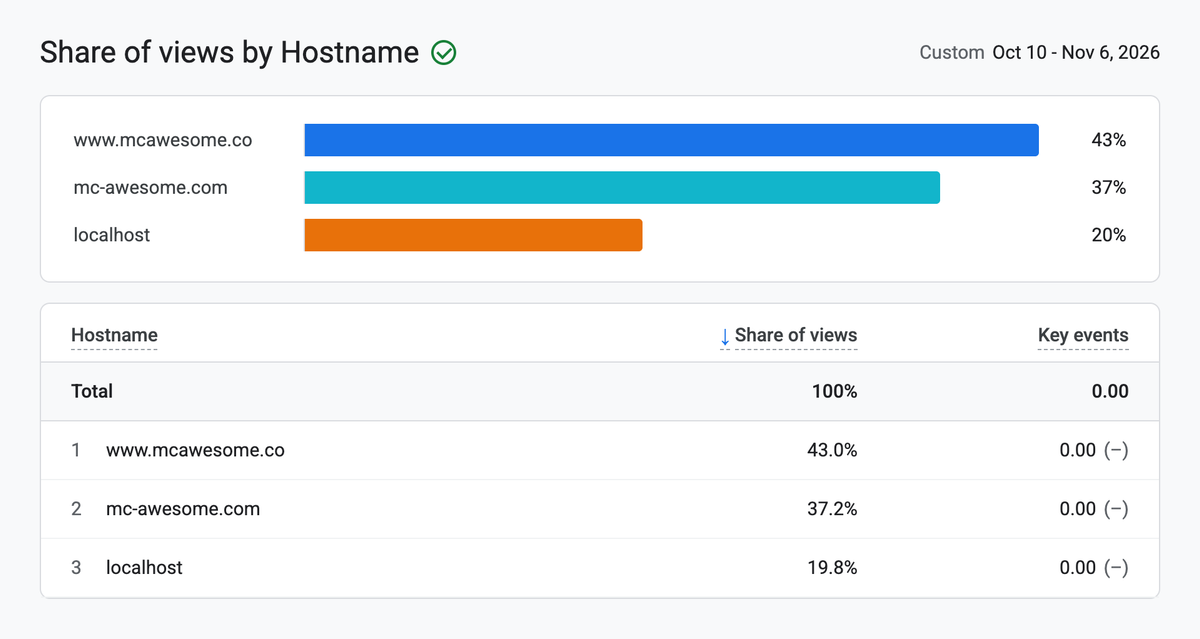
None of this was hidden. It was all there for anyone who looked. We just hadn’t looked.
What we changed
By November 7 we had made these changes:
- Analytics now runs only on the live site, so building and testing no longer add views.
- The site now sends a signal to Analytics when someone submits an enquiry, clicks our email address or plays our film. Enquiries and email clicks are marked as key events, the ones Analytics treats as results.
- Our old address now sends everyone permanently to the new one, so there is one site to measure.
- Detailed data is now kept for 14 months instead of two. That only works going forward. The older data is already gone.
- Our own visits are now marked so they can be left out of reports.
Some of this we haven’t confirmed yet, and we won’t pretend otherwise. We haven’t yet seen a real enquiry arrive in the reports, so we’re sending a test one before we trust the count. We haven’t yet seen our own visits disappear from the reports either. And our old reports stay mixed, so any number from before November 7 has to be filtered by site address before we can use it.
Then Google found one more
Two days later, Google Search Console sent us an email. Three of our project pages were “not indexed”, with the reason “Duplicate, Google chose different canonical than user”.
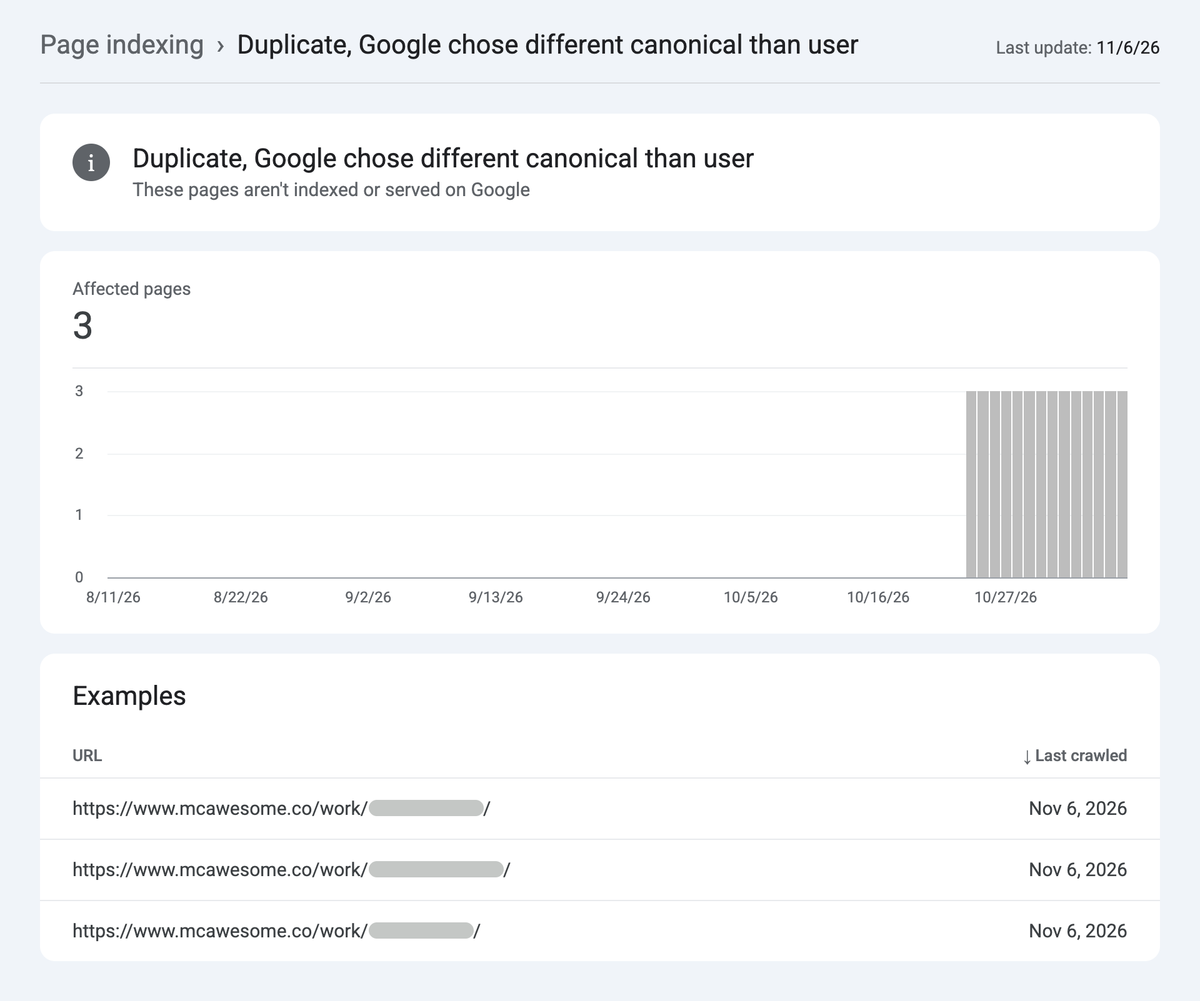
In plain words: every page on our site answered at two addresses, one ending in a slash and one without. Our pages told Google to use one version. Our own links all pointed to the other. Google went with the links. The page we checked was still in Google under the other address, so it hadn’t vanished from search. But we were sending mixed signals and leaving Google to guess.
We fixed it the same day. Every page now has one address, and the other version sends people to it. Google hasn’t rechecked those pages yet.
We only knew about this because Search Console was set up and someone read the email.
Why these two tools matter
You’ll hear about both from whoever runs your website. They do different jobs.
Search Console shows what happens before the click. Which searches your site appears for, how often people click, which pages Google can find, and problems like the one above.
Google Analytics shows what happens after the click. Which pages people visit, where they came from, and whether they do the thing you want, like sending an enquiry.
Both are free. Without them, you only have someone else’s word for how your website is doing.
Five things you should be able to answer
You don’t need to know how to set any of this up. You only need to know the answers exist, and who can give them to you.
1. How many enquiries did the site bring in last month?
If enquiries are counted, this is a single number in Analytics. If nobody can tell you, they probably aren’t being counted. Ours weren’t.
2. Where did those people come from?
Google search, social media, another website, or typing your address directly. The useful answer connects each source to enquiries, not just to visits.
3. Do the numbers count only real visitors?
Your agency’s test sites and your own team’s visits can end up in the same reports as your customers. On our service page, all but one view was us.
4. What do people search for when they find you?
Search Console lists the searches that showed your site, how often it appeared and how often people clicked. Analytics on its own can’t tell you this.
5. Can Google see all your important pages?
Search Console lists the pages Google has indexed and gives a reason for the ones it hasn’t. Some of those reasons are normal, like an old address that now redirects. The ones to worry about are pages you want people to find.
What to ask whoever runs your website
None of these are trick questions. A good agency can answer each of them quickly, often with a screenshot.
Do I own these accounts, or do you?
Your business should own its Google Analytics and Search Console accounts, with your agency added as a user. If you ever change agency, the data stays with you.
Is an enquiry counted when someone submits a form?
Ask them to send a test enquiry and show you where it appears in the reports.
Is your team’s own traffic left out?
That includes their visits to your live site and any test versions of it.
How long is our data kept?
Analytics keeps detailed data for two months unless someone changes the setting. Changing it later doesn’t bring back what was already lost.
You can do this yourself
Most of this needs only access to your own accounts and the questions above. You don’t need to become an analytics expert. You need to know what to ask and to recognise a clear answer.
If you’d like a second pair of eyes on your numbers, talk to us.